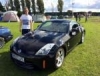
ThreeFiddyZ Posted June 9 Posted June 9 (edited) So, after my 10th consecutive year of Zed ownership passed by last year, I thought it was about time to start a build thread to document at least some of what I've been up to with my Zed during my ownership, particularly more recently. Since the beginning, I've always wanted any changes or improvements made to seamlessly blend into and compliment the rest of the car, with the aim of an 'OEM+' style (so I have been known to be quite particular/minimalistic with my build to say the least!) whilst at the same time, doing my best to keep on top of any issues to make sure it is maintained to the highest standard. Anyway, to get the ball rolling, here is a picture of my Zed from a few years ago and I will begin to add some updates to this thread shortly to show some of the more recent work! Edited June 9 by ThreeFiddyZ 2 Quote
ThreeFiddyZ Posted June 9 Author Posted June 9 (edited) So, now that I've broken the ice somewhat, let's get started. As many others will probably agree, unfortunately the plastic lenses on 350z headlights don't tend to stand the test of time too well. Whilst the headlight internals are pretty reliable (providing you have your wheelarch liners still fitted and don't remove them!) the lenses deteriorate and become cloudy. Although I did wet sand and polish the lenses on my original headlights, although most would have been happy with this, the perfectionist in me still wasn't happy with the result. I am really my own worst enemy. So, anyway, I went hunting and thankfully after a year or so, I managed to buy two new genuine Nissan facelift headlights for a decent price, so naturally these were the first to be fitted. Before During (with one of the old headlights photobombing the picture...😄) After 😁 It's amazing how simply replacing the headlights has already taken years of age off the front of the car, very happy with the results. The only issues I ran into when dropping the bumper and swapping the headlight out for the first time was that there were actually three bolts in the liners that had to be undone to release the front bumper, and the headlight washers needed to be removed as part of the process. This can be achieved by simply gently pulling the headlight washer covers forward as they are spring loaded, which gives access to unclip the headlight washer covers. Funnily enough I was more nervous about breaking the headlight washer covers more than anything else, so big thumbs up up to @davey_83 for the video he made on this below, this was a huge help. Edited June 9 by ThreeFiddyZ 2 Quote
ThreeFiddyZ Posted June 9 Author Posted June 9 Next on the list... For the last few weeks, I'd noticed a small leak of washer fluid on my garage floor. After pulling back the drivers side arch liner and inspecting the pumps, I found that the front washer pump itself was leaking, rather than the washer bottle or pump to bottle seal. This also seems to be a common issue but is thankfully easily addressed. I took the opportunity to replace both the front and rear washer pumps, using the below. Front Washer Pump (Starline OE equivalent) Part No: OE-48870001S Rear Washer Pump (Blueprint OE equivalent) Part No: ADN10316 The front and rear washer pumps can be obtained from a few different places using the above part numbers. I bought my front pump from Halfords for £11.99, but had to buy the rear pump from Amazon for £22. Don't be fooled like me and assume the front and rear pump are the same. I assumed they were and ordered two front pumps, but the electrical connectors are different. To replace, it's dead simple. Whilst it is probably easier to jack your Zed up and remove the wheel, I opted to turn the steering full lock left, unscrew and peel back the arch liner, and go from there. To disconnect the existing pumps, whack a drain tray underneath and then simply move the pumps downwards slightly whilst you pull them out. Mine were quite stubborn but eventually popped out allowing me to replace them. Job done and onto the next one. 2 Quote
ThreeFiddyZ Posted June 9 Author Posted June 9 Next job...sorting out my Pioneer headunit install. Back in 2020, I got fed up of burning CD's and installed a Pioneer SPH-DA250DAB headunit to replace my Bose headunit, via the Busters mod method, instead of using the RCA pre-outs. This was a huge much needed improvement and bought the Zed into the modern world with some nice features like Android Auto, DAB, and so on. However, ever since the Pioneer headunit was fitted I found that I ended up with a constant white/static noise emitted from the Bose speakers, even with the ignition on and engine off. The white noise would get even louder when I switched the input source over to Android Auto because for some reason, Pioneer decided that when Android Auto is launched they would configure the SPH-DA250DAB model to further increase the gain/volume when Android Auto launched. This was a frustrating problem that nobody else seems to have experienced with the 350z. Some research suggested that I should fit a ground loop isolator, but after some testing I established that this was not a grounding problem and this would not fix my issue, as the white noise was constantly there with the engine off and it did not change in pitch/frequency/sound with the engine running and revving. The only way I can describe it (for those that are old enough 😁) is the same type of noise you'd hear if you played a blank cassette at a loud enough volume. In summary, irritating as hell! As I was convinced this was an issue with excessive gain levels somewhere, I tried a number of different things based upon some information I could find. - Reconnecting the Bose headunit and turning the volume all the way to maximum, then reconnecting my Pioneer headunit (to try to have the Bose amp gain match the Pioneer headunits gain level) - Reconnecting the Bose headunit and turning the volume all the way to the minimum, then reconnecting my Pioneer headunit (to try to reduce the gain set on the Bose amp) - Reconnecting the Bose headunit to turn off the speed sensitive volume control, then reconnecting my Pioneer headunit (Some information suggested that although the SVC setting is configured on the Bose headunit, the SVC is actually enabled on the Bose amp. I actually found this is enabled by default in the Bose headunit) - Tweaking various settings in the Pioneer headunit to turn off loudness, equalizers, and so on. Nothing made any difference! After spending quite a few hours researching the issue, I managed to find that quite a few Mazda MX5 and Corvette owners have experienced similar issues with their Bose systems, and unless you want to use the RCA pre-outs to connect to the Bose system (which results in incredibly poor volume) the solution is to purchase and fit an LOC (line output converter) which allows you to adjust the gain on each speaker channel. So, that's what I did. I bought a Scosche Oea4 4-Channel Adjustable Factory Amplifer Interface (which Scosche themselves state is intended for exactly this scenario) for £13 from Amazon, and after a quick test fit with some wagos to verify this resolved the problem, I went ahead and cut and soldered the Schosche Oea4 into the loom I'd built when following Buster's mod, connecting the Pioneer headunits speaker output to the input side of the Scosche Oae4, and the output side of the Scosche Oae4 to the speaker cables going to the Bose amp (which are converted from RCA to speaker level inputs when you follow Busters mod). Problem solved without any noticeable loss in volume and one happy chappy 😄 Excuse the hastily edited photo (courtesy of cs2000) below, but hopefully it makes it clear for anyone who has the same problem and needs the solution. Next slide please... 😆 1 Quote
ThreeFiddyZ Posted June 9 Author Posted June 9 Side quest...repairing my 350z Xanavi sat-nav screen. Unfortunately, whilst disassembling the centre console in my Zed to remove my Pioneer headunit the loom/harness for the sat-nav buttons ended up rubbing against my 350z sat-nav screen, putting some fine scratches in the bottom half of the screen. Whilst I know the 350z sat-navs are not particularly held in high regard (and many just remove them) I couldn't live with these scratches as I've opted to keep mine in place. So, after some research it appeared that I had two options. 1) Polish the sat-nav screen to remove the existing anti-glare coating and scratches. Whilst this would probably give a good result, it would take quite a lot of time to achieve 2) Find and purchase a screen protector with an anti-glare coating, and install it over the top of the sat-nav screen In my case, I opted for the second option. For future reference, the height of the 350z Xanavi sat-nav screen is 87mm and the width is 154.8mm (minus the bezels) as it is a 7 inch screen. With these dimensions, I was able to purchase a Brotect matt screen protector with anti-glare from Amazon, which once fitted has completely hidden the scratches on the sat-nav screen. Result! Quote
ThreeFiddyZ Posted June 10 Author Posted June 10 (edited) Next job...replacing the clockspring (also referred to as a squib/spiral cable) behind the steering wheel. I'd noticed over the last year that my steering wheel controls and cruise control buttons would stop working when the steering wheel was in certain positions, which is usually the first symptom that the spiral cable connections within the clock spring are starting to fail. This will eventually result in an airbag light as the connection to the drivers airbag starts to fail, as well as issues with your horn. I have had this happen once before in 2016 and I posted about it at the time, as I had no end of issues. That said, as I have to revisit this again I thought I'd do a proper write-up this time round with a bit more information, as my previous post is lacking. So, as you may have already guessed I have a 2007 350z rev-up. As it is a GT model (like most are in the UK) all GT models have VDC (stability control) which relies upon (amongst other sensors) a steering angle sensor that physically latches into the rear of the clockspring. This ensures both the clockspring and steering angle sensor rotate together as one assembly when the steering wheel is turned to give the ECU a steering angle value. This is where the cheap non-genuine clocksprings available on Amazon and Ebay cause issues. Although they are temptingly cheap and in plentiful supply, the rear of the clockspring is wider than it should be, resulting in the steering angle sensor not latching into the clockspring. As a result, the ECU does not receive any steering angle value as the steering wheel is rotated as the vehicle travels, but other sensors (such as the yaw and speed sensors) clearly indicate movement. This conflicting information provokes repeat VDC malfunctions, with VDC applying the brakes to individual wheels to try to correct the cars trajectory as it travels, even though everything is fine. So, with the cheap Amazon/Ebay pattern parts out of the question and this in mind you have two options. 1) Find a replacement used part from another 350z of the same year (or as close a year as possible) 2) Obtain the appropriate Nissan part number to get a new replacement part Previously I went for the first option, and bought a used genuine Nissan clockspring from a 2005 (pre-facelift) 350z. Whilst this worked, there is always a risk that the replacement used part isn't much better than what you are replacing. Additionally, I lost the backlit feature of my steering wheel controls. This is because the earlier 350z's did not have backlit steering wheel controls and therefore the clockspring I had purchased only had 7 pins on the front connector and a different pin layout on the second half of the first rear connector. Whereas the correct facelift/rev-up clockspring has 8 pins on the front connector and a different pin layout on the second half of the first rear connector. That said, both clocksprings only have one yellow two pin airbag connector which is correct in my case. Big thanks to @P15UL T for sharing some photos of a clockspring he had previously sold from a rev-up to help me confirm. 2005 350z clockspring 2006/2007 350z rev-up clockspring This time round, I opted to purchase a new replacement part and after contacting a few different Nissan dealers to get pricing and order one, I can confirm that the correct Nissan part number for a replacement clockspring on a Nissan 350z rev-up is B5567-CF42E, which should look like the above photos. I also ordered two new security torx bolts (Nissan part number 878508990A) which hold the drivers airbag in place as these seem to be quite fragile and can break or strip if you are not careful. Once I had replaced the clockspring I ran the steering angle sensor reset procedure using Nissan Datascan on a Windows Laptop and viola, all back to normal. Steering wheel controls working properly again, and my steering wheel control illumination is back...woohoo 😁 Edited June 10 by ThreeFiddyZ 4 Quote
davey_83 Posted June 10 Posted June 10 Another long standing Z owner, looks very nice indeed 👌 Very satisfying tackling jobs yourself in keeping these old girls in fine fettle. 1 Quote
Andy_Muxlow Posted June 10 Posted June 10 Excellent work bud. Keep it up and keep updating s as you go! 1 Quote
ThreeFiddyZ Posted June 10 Author Posted June 10 Thanks both! It's coming along, slowly but surely 👍 Quote
ThreeFiddyZ Posted June 10 Author Posted June 10 (edited) Next job.. freshen up the steering wheel. I'd noticed that the clearcoat on the steering wheel controls had started to peel off. This year I'd finally had enough, so I decided to try to repair it. This was a bit of a challenge, as I didn't want to go down the route of having them painted or wrapped (which would remove the brushed aluminium finish effect on my steering wheel controls) but I did want to renew the lacquer/clearcoat on them to freshen them up. To achieve this, I started out by wet sanding with 800 grit and then 600 grit to remove the existing clearcoat. The key I found is to progress carefully and take your time. Don't sand too aggressively on these pieces, as you'll end up burning through the anodised coating of the aluminium and you'll end up with a non-uniform finish before you even pick up your can of lacquer (ask me how I know). Anyway, once I'd removed most of the old clearcoat, I used Halfords clear lacquer to apply three coats, then used cutting compound/polish afterwards to remove the orange peel effect in the clearcoat. Before After (one appears brighter than the other, but it's just the lighting 🙄) Quite happy with the result. Onto the next job... 🙂 Edited June 10 by ThreeFiddyZ Quote
ThreeFiddyZ Posted June 10 Author Posted June 10 (edited) The most recent job..investigate and address an issue with hunting at idle after a cold start. Over the last few years, I'd noticed that my Zed would hunt at idle for the first few minutes of a cold start, as per the below video. This would never happen during a warm start, and I had no other issues (no engine light, no loss of performance, etc). I did some research and most of the information I found suggested that I needed to do some data logging/capture via OBD whilst the issue occurred, to try to work out where the issue might be. Luckily, whilst I was looking to determine what metrics I might need include when data logging for a hunting idle, I stumbled across this absolute beauty of a forum thread, with one particular post. UPREV TT HR 350Z Issue | General Tuning Discussion Safe to say, my reaction went a little like this. So, armed with this new information I thought cleaning the throttle body would be a good place to start, given that I had never done this in my ownership. Battery terminals disconnected, airbox out, intake pipework and PCV disconnected, and this is what I was left with. We might be onto something here. So....yeah. It's safe to say that my throttle body definitely needed a good clean as it was definitely sticking. So, I gently cleaned it with some carb cleaner. And after reassembly, clearing the self-learn and performing an idle air relearn via Nissan Datascan, the issue is fully resolved and I now have a solid steady idle after a cold start. The throttle body must have been sticking and unsticking when cold, causing the hunting at idle, but then freeing off enough after a few minutes which allowed a normal idle. What a find and result! 😁 Edited June 10 by ThreeFiddyZ 2 Quote

Recommended Posts
Join the conversation
You can post now and register later. If you have an account, sign in now to post with your account.